
mySugr - Diabetes Tracker Log
mySugr GmbHMedical
4.513.39K Reviews
- Version
- 3.161.0
- Installs
- 5.00M
- Age Rating
- Everyone
Screenshots
Our Review of mySugr - Diabetes Tracker Log
 Analysis by Appyee
If you're managing diabetes, you've probably heard of the mySugr - Diabetes Tracker Log. It's a handy app that promises to turn the hassle of diabetes management into something more manageable—and dare I say—enjoyable. So, I decided to give it a whirl and see what all the buzz is about.
First Impressions of the Interface
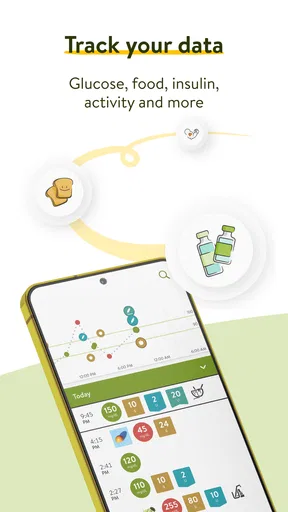
Jumping into the app, you immediately notice the user-friendly interface. It’s clean, intuitive, and doesn’t overwhelm you with too many features at once. The dashboard gives you a neat overview of your blood sugar levels, carb intake, and insulin doses. It’s like having a personal assistant that’s actually helpful.
The color scheme is easy on the eyes, and navigation is a breeze. You won’t find yourself lost in endless menus, which is a huge plus when you’re managing something as critical as diabetes. The app design feels modern and well thought out, making it easy to dive right in without a steep learning curve.
Tracking Made Simple
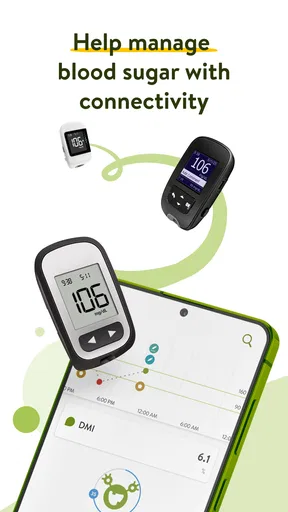
One of the standout features of the mySugr - Diabetes Tracker Log is how it simplifies tracking. You can log your blood sugar levels manually or connect it to a compatible device for automatic input. I found the logging process quick and painless, which is great because who has time for complicated data entry?
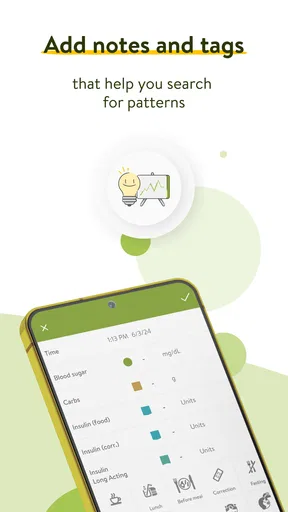
Additionally, the app lets you track your meals, medications, activities, and even mood. Yes, mood! This holistic approach helps you see how different factors affect your blood sugar levels. Plus, the app’s smart search makes it easy to find past entries, so you can spot trends and patterns in your data.
Building a Routine That Holds Up on Busy Days
The value of a tracker comes less from a perfect streak than from having useful entries when life gets hectic. I’d make the first few days deliberately simple: record glucose readings consistently, then add meals, medication, activity, or mood only when those details help explain a result. Trying to capture every part of every day from the start can make logging feel like another chore.
A realistic routine might be to enter a reading at the moments you already check it, then add a brief note when something unusual happened: a late meal, an unexpectedly active afternoon, or a disrupted night. That gives the history context without asking you to write a diary. If you use a compatible glucose device, automatic syncing can reduce repeated typing, but I’d still glance at the imported entries so a missed connection or an unexpected value doesn’t quietly distort the picture.
This is also where the app works best as a record rather than a judge. A blank day does not mean you have failed; it means there is less information for that day. I would avoid backfilling a week from memory unless I could distinguish what I know from what I’m guessing. A smaller, accurate log is more useful in a conversation with a clinician than a complete-looking record built from uncertain recollections.
Personalized Insights and Reports
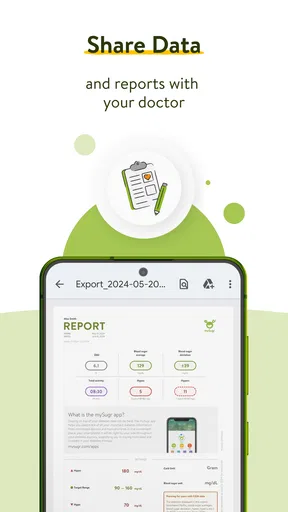
Now, here's where things get interesting. The app doesn’t just collect your data—it actually gives you insights. The reports section provides a comprehensive analysis of your stats over time. You’ll get to see averages, deviations, and other nerdy stats that might just turn you into a data geek.
The insights are personalized, helping you understand your unique patterns. This can be a game-changer for adjusting your treatment plan or having informed discussions with your healthcare provider.
Making Reports Useful in a Real Appointment
Reports are most helpful when I treat them as a prompt for questions, not a treatment plan. Before an appointment, I’d look for a repeated pattern rather than reacting to one striking entry, then bring the relevant period and any notes about meals, medication, activity, or mood. That makes it easier to ask a focused question, such as whether a recurring change deserves attention, without drawing a clinical conclusion from an app screen.
There is a practical trade-off: more context can make a report easier to interpret, but adding details takes time and memory. I’d prioritize the entries that explain a change or matter to the discussion, rather than trying to document everything. If your clinician already has a preferred format or wants readings recorded another way, follow that process; a personal log should complement care, not replace it.
Gamification for Motivation
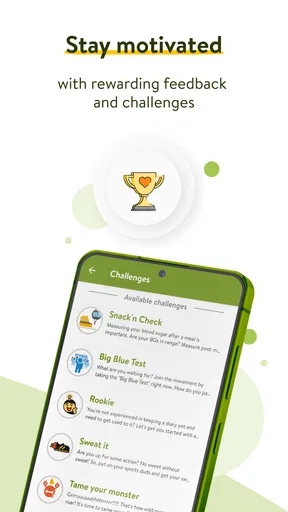
Living with diabetes can be a grind, but the app’s gamification elements add a fun twist. You earn points for logging entries and completing challenges. It’s a bit like leveling up in a video game, but instead of slaying dragons, you’re conquering your health goals.
These small rewards can be surprisingly motivating. It turns daily management tasks into a series of mini-games, making it more engaging. It might not be for everyone, but if you’re competitive, you’ll definitely appreciate this feature.
Settings and Sync Choices Worth Checking
Before relying on automatic entries, I’d check that the glucose device you use is compatible and that its connection is working as expected. The app’s central promise is less manual transcription, but device syncing only helps if the right source is connected and incoming readings appear in the log. If you prefer entering values yourself, manual logging remains a useful fallback rather than a reason to abandon the app.
It is worth deciding early how much personal context you want to record. Meals, medication, movement, and mood can make a trend easier to understand, but not every user needs every category every day. A lighter setup can be more sustainable, especially if you are already using another health tool or following a clinician’s logging instructions. I’d also check any sharing or health-platform connections before turning them on, so the information travels only where you expect.
The app is free to download, with in-app purchases ranging from $2.99 to $39.99 per item. I’d begin with the basic workflow and only consider a purchase if a particular option solves a real problem for me. That avoids paying for something I may not use and makes it easier to judge whether the core logging habit fits my life first.
Faster Patterns for Experienced Users
Once the basic routine feels natural, repeatability matters more than adding more fields. I’d use the same small set of habits around readings—log them when they are taken, add context only when it clarifies a meaningful change, and revisit the history when preparing for a discussion. That reduces the effort of deciding from scratch what to enter each time.
Search can help turn an old entry into a useful reference, especially when you remember the circumstance but not the date. Instead of scrolling through a long timeline, search for a distinctive term or event you recorded. The trade-off is that search is only as useful as the notes you have actually written, so brief, consistent descriptions are easier to find than vague labels.
For people who already use a compatible device, syncing and manual entry can serve different purposes: let the device handle routine readings, and use a note or relevant context for the exceptions that need explaining. I would not assume a sync is a complete record without checking it occasionally. A quick review can catch gaps while they are still easy to clarify.
Where the App May Not Be the Right Fit
This is a medical tracking tool, not a substitute for professional advice or a device that independently manages diabetes. If you want an app to make treatment decisions for you, or you do not want to enter health information at all, this is not the right expectation to bring to it. The reports can organize information, but interpretation and changes to care belong in a conversation with a qualified healthcare professional.
It may also be a poor fit if you already have a clinician-mandated system that you find easier to maintain, or if your priority is a bare-bones glucose log with no interest in meals, medication, activity, mood, or motivational extras. A simple notebook or a more limited tracker can be quicker for someone who only wants to record a reading and move on. On the other hand, someone who values searchable history and connected-device entry may find that a basic paper log takes more effort to review.
The community and reward elements will not motivate everyone. Some people prefer private, quiet tracking and may find points or social features irrelevant. I’d treat those as optional reasons to stay engaged, not as the app’s main value. The strongest case for using it is having a practical record that you can keep up with and review.
The Social Element
Another cool aspect is the community feature. You can connect with other users, share tips, and even engage in friendly competitions. It’s like having a support group in your pocket. The community is active and supportive, which can be really encouraging when you’re having a tough day.
Privacy and Security
Of course, when dealing with health data, privacy is a top concern. The app takes security seriously, with encrypted data storage and the option to set up a PIN. You can rest easy knowing your information is protected. Plus, you have control over what data is shared and with whom.
The app also integrates with major health platforms like Apple Health and Google Fit, which is a nice touch for those who like to keep all their health data in one place.
Because diabetes records are personal, I’d review connected services and sharing choices with the same care I use for any health app. Linking a platform can be convenient if you already organize health information there, but it is not necessary for everyone. If you prefer to keep the log focused, you can make decisions about those connections based on how you actually use your other health tools rather than enabling everything by default.
What to Expect Before Getting Started
mySugr is a medical app from mySugr GmbH, available at no cost to install, and it is rated for Everyone. It has a 4.5 average from around 131,000 ratings, with over 5 million installs, which suggests it has found a broad audience among people looking for a diabetes log. The current version is 3.142.0, and it requires iOS 11 or later.
For someone new to diabetes tracking, I would start by asking what information their healthcare team wants them to keep. Then I’d set up only the relevant parts of the log, try manual entries or a compatible-device connection, and see whether the routine is comfortable before adding more detail. For someone experienced, the better test is whether it makes existing record keeping faster and whether its reports are convenient for reviewing patterns.
Final Thoughts
Overall, the mySugr - Diabetes Tracker Log is a robust tool for managing diabetes. It’s packed with features that make tracking and analyzing your health data simple and even enjoyable. The friendly interface, combined with insightful data analysis and community support, make it a top choice for anyone looking to take control of their diabetes management.
Whether you're newly diagnosed or a seasoned pro, this app has something to offer. It's like having a personal diabetes coach right at your fingertips, helping you navigate the ups and downs with ease. So, if you’re looking to transform your diabetes management routine, give mySugr a try—you might just find it’s the sidekick you’ve been looking for.
Privacy and Permissions
See what permissions an app requests and how it handles your data.
- Location
- approximate location (network-based), precise location (GPS and network-based)
- Photos/Media/Files
- read the contents of your USB storage
- Storage
- read the contents of your USB storage
- Other
- view network connections, pair with Bluetooth devices, access Bluetooth settings, full network access, control Near Field Communication, run at startup, control vibration, prevent device from sleeping
Verdict
Strengths of mySugr - Diabetes Tracker Log
- User-friendly interface for easy navigation.
- Detailed logging for comprehensive tracking.
- Customizable reminders for medication.
- Integrates with other health apps seamlessly.
- Supports multiple languages for accessibility.
Limitations of mySugr - Diabetes Tracker Log
- Requires premium for some features.
- Limited offline functionality.
- Data sync can be slow at times.
- Initial setup can be time-consuming.
- Occasional app crashes reported.
Similar Picks in This Category
View All
WebMD: Symptom Checker
WebMD, LLC4.1

Microphone Amplifier
DOSA Apps4.2

Anatomy Learning - 3D Anatomy
3D Medical OU4.5

Period Tracker and Calendar
SimpleInnovation4.9

GoodRx: Prescription Coupons
GoodRx4.8

CVS Health
CVS Pharmacy4.5
Frequently Asked Questions
What is mySugr and how does it help manage diabetes?
mySugr is a comprehensive diabetes management app designed to help users track their blood sugar levels, medications, meals, and activity. It provides personalized insights and reports to help users understand their health trends. The app also integrates with other health devices, making it a convenient tool for managing diabetes on a daily basis.
Is mySugr suitable for all types of diabetes?
Yes, mySugr is designed to support individuals with type 1, type 2, and gestational diabetes. It provides customizable features that cater to different needs, allowing users to log relevant data and receive tailored advice. The app's flexible design ensures it can be adapted to various diabetes management routines.
Does mySugr sync with other devices and health apps?
mySugr seamlessly integrates with various health devices and apps, such as glucose meters, insulin pumps, and fitness trackers. It also connects with Apple Health and Google Fit, allowing users to consolidate their health data in one place for a more comprehensive overview of their diabetes management.
Is mySugr free to use, or does it require a subscription?
mySugr offers a free version with basic features that can be sufficient for standard diabetes tracking. However, for those seeking advanced functionalities, there is a subscription-based Pro version. The Pro version includes features like PDF reports, blood sugar reminders, and insulin calculation capabilities.
How secure is the data stored in mySugr?
mySugr prioritizes user privacy and data security. The app uses encryption to protect personal health information and complies with GDPR standards. Users can feel confident that their data is secure, and they have control over what information is shared and with whom, ensuring privacy is maintained.
